
Understand VIP, buy-once resolver unlocks, and rewarded VIP
Learn what Zwind's free tier allows, what Zwind VIP unlocks, when a single resolver purchase is enough, and how rewarded VIP works.
Zwind can be used for basic WebDAV serving without buying VIP. You will see the VIP screen only when you open Unlock Zwind VIP, try a VIP-only feature, or open a paid resolver that is not unlocked yet.
The screenshots use the English app UI. On a Chinese UI, Unlock Zwind VIP is 解锁 Zwind VIP, Projection Resolvers is 投影解析器, Restore Purchases is 恢复购买, and Watch Ad to get 1 day VIP is 看广告领取 1 天 VIP. StoreKit product names and prices can still appear in your App Store language.
Pick the right unlock
Use this table when Zwind blocks an action:
| You want to do this | Use this unlock |
|---|---|
| Run more than the free server limit | Zwind VIP |
| Use all current and future resolver extensions | Zwind VIP |
| Use one paid resolver, such as Web Media Projection or Emby library parsing | Buy that resolver once, or use Zwind VIP |
| Use Server Lock, Face ID start protection, non-anonymous access controls, casting, App Logs, or remove ads | Zwind VIP |
| Temporarily try VIP-only features for one day | Watch a rewarded ad, when the row is available |
| You already bought VIP or a resolver on this platform | Restore purchases |
Buying one resolver does not make the whole app VIP. For example, a Web Media Projection buy-once unlock lets that resolver work after purchase, but it does not unlock App Logs, Server Lock, casting, unlimited servers, or other paid resolvers.
Open the VIP and resolver entries
Open Settings. The Unlock Zwind VIP row opens the VIP purchase sheet. Projection Resolvers opens the resolver catalog; the row is marked VIP because VIP unlocks all resolver extensions, but individual resolvers can still be bought separately.
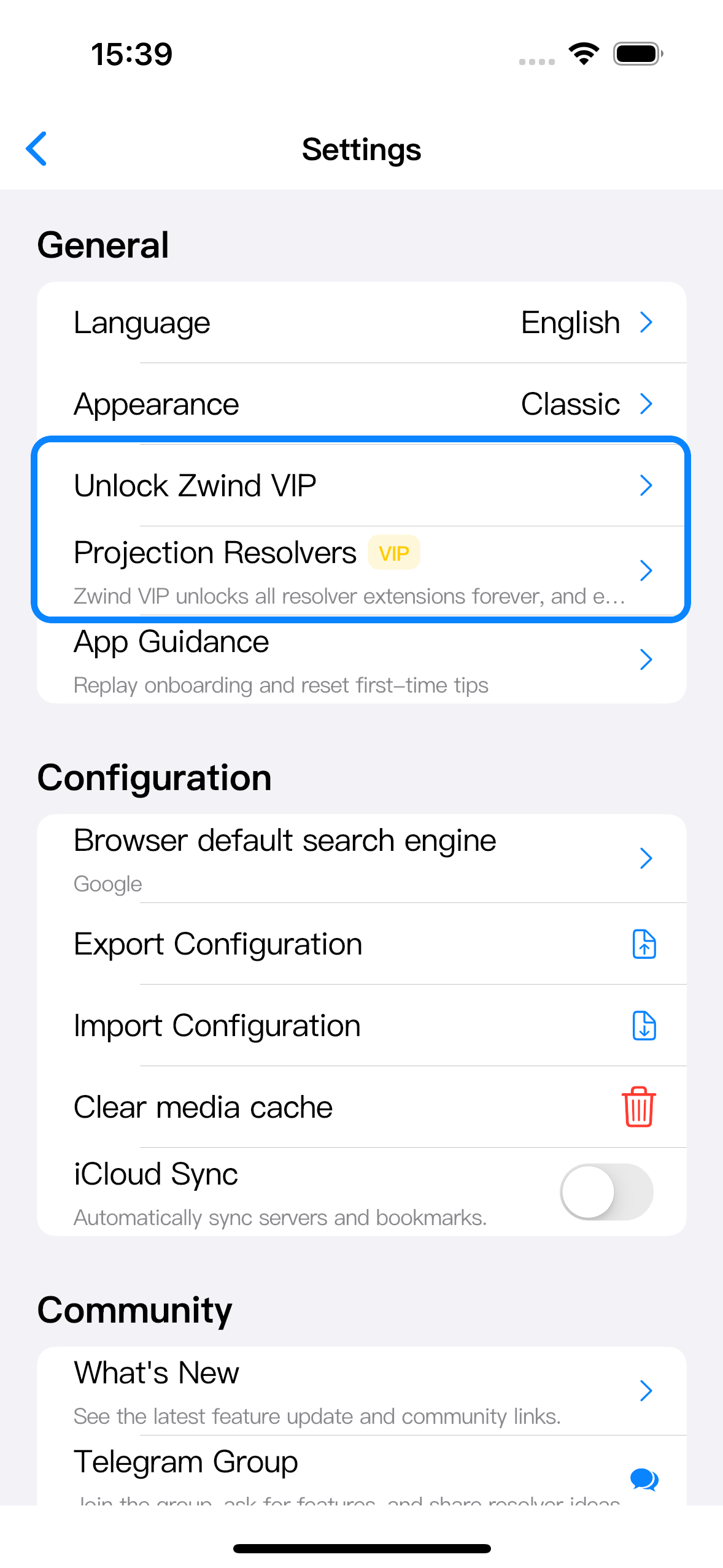
If your device supports rewarded ads and you do not already have VIP, Settings can also show Watch Ad to get 1 day VIP. Tapping it opens the rewarded ad flow. This guide does not show the ad page because the ad content is provided by the ad network, not by Zwind.
What VIP unlocks
Tap Unlock Zwind VIP to see the VIP sheet. Use Restore Purchases if you already paid on the same App Store platform. Use an Unlock button only when you want to buy that VIP product.
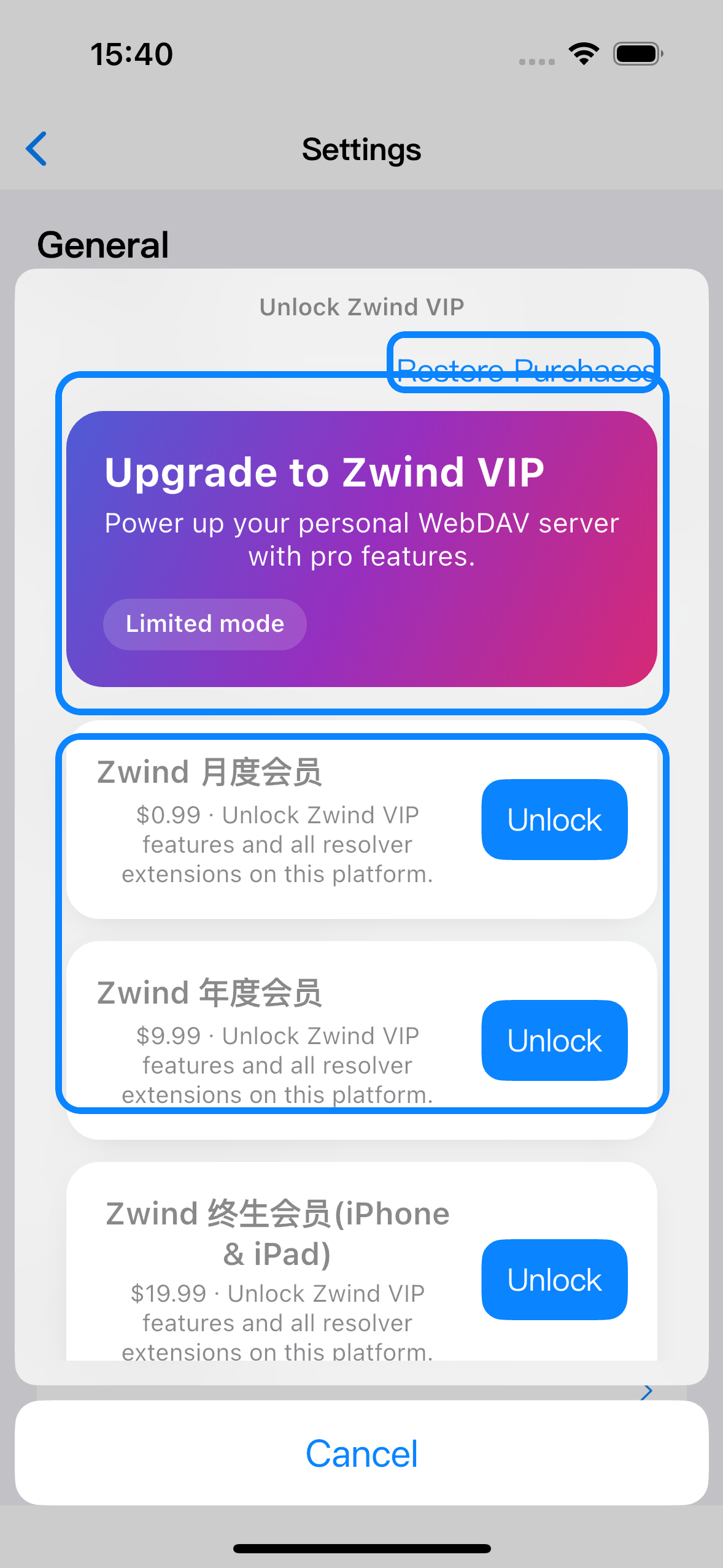
VIP is the broad unlock. While VIP is active, Zwind treats VIP-gated app features and paid resolver extensions as available. The main VIP-only areas are:
| Area | What changes after VIP |
|---|---|
| Servers | You can start beyond the free server limit. |
| Resolver extensions | Paid resolvers are available without buying each one separately. |
| Server protection | Server Lock, Face ID start checks, and protected access controls become available. |
| Media tools | Casting and other VIP media controls can be used where the player supports them. |
| Diagnostics | App Logs opens instead of showing the VIP sheet. |
| Ads | In-app ads are removed where Zwind would otherwise show them. |
When buy-once resolver access is enough
Open Settings > Projection Resolvers, then open the resolver you want. If it is locked, its detail page shows an unlock button and a status such as Buy once or use VIP.
Choose buy-once when you only need that resolver. After purchase, that resolver keeps working without VIP on the same supported platform. Choose VIP instead when you expect to use several resolvers or other VIP features.
Resolver buy-once access is checked per resolver. Buying the RSS resolver does not unlock Web Media Projection, Emby, or Quark search import. Buying one resolver also does not remove ads or unlock server protection.
Watch an ad to get 1 day VIP
When Watch Ad to get 1 day VIP appears in Settings, it grants 24 hours of VIP access after the rewarded ad finishes successfully. During those 24 hours, Zwind treats VIP-gated features as active, including paid resolvers.
If you leave the ad early, the VIP ticket is not granted. If the row is disabled or the app says the ad is unavailable, the ad network has not provided a ready rewarded ad for this device yet; try again later or use the paid VIP sheet.
Rewarded VIP is temporary. When it expires, paid VIP-only features lock again unless you have a paid VIP entitlement or a separate buy-once resolver entitlement for the resolver you are using.
Restore purchases
Use Restore Purchases from the VIP sheet or resolver unlock sheet when:
| Case | What restore checks |
|---|---|
| You reinstalled Zwind | Existing App Store purchases for the current account. |
| You changed devices on the same platform | Purchases tied to the same store account and supported platform. |
| A resolver or VIP feature still looks locked after payment | Whether the purchase receipt can refresh the entitlement. |
Restore does not create a new purchase. If Zwind says nothing was restored, check that you are signed into the same App Store account and that the purchase was made on the platform you are using.
If an action is blocked
When Zwind opens the VIP sheet from a blocked action, read which feature you were trying to use:
| Blocked action | Continue with |
|---|---|
| Starting another server | VIP or rewarded VIP while active. |
| Opening App Logs | VIP or rewarded VIP while active. |
| Enabling Server Lock or Face ID start protection | VIP or rewarded VIP while active. |
| Using a locked resolver | Buy that resolver once, use VIP, or use rewarded VIP while active. |
| Using a resolver you already bought | Restore purchases, then reopen the resolver detail page. |
After an unlock, go back to the blocked screen and try the action again. For server settings and resolver bindings, restart the server if the screen tells you the running server needs to reload its configuration.